Analytics Tracking - Marin Murphy
I shared my blog link via email and LinkedIn, and then tracked my analytics to find out the best method for engagement. Here is what I found:

To start, I emailed 3 family members, asking for them to view my blog. I provided the blog link as follows https://pursue-persuade.squarespace.com/students/marinmurphy?utm_source=squarespace-marinmurphy&utm_medium=email&utm_campaign=assignment-2.
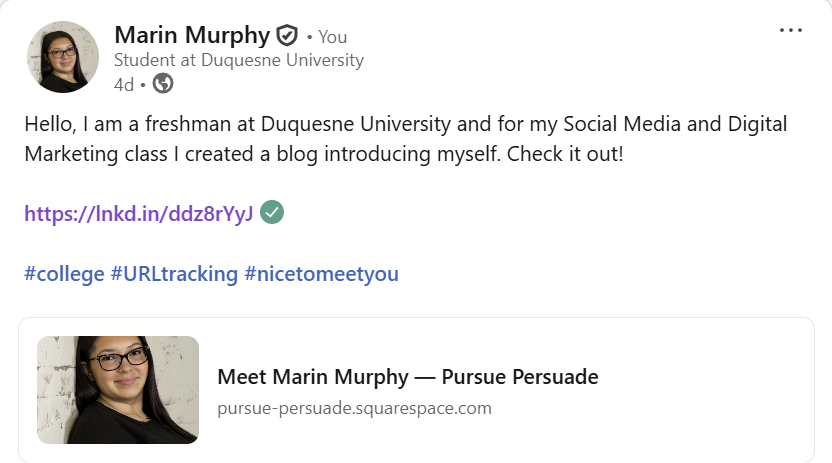
Next, I posted my blog link to my public LinkedIn account, asking viewers to look at my blog. I provided the following link https://pursue-persuade.squarespace.com/students/marinmurphy?utm_source=squarespace-marinmurphy&utm_medium=linkedin&utm_campaign=assignment-2.
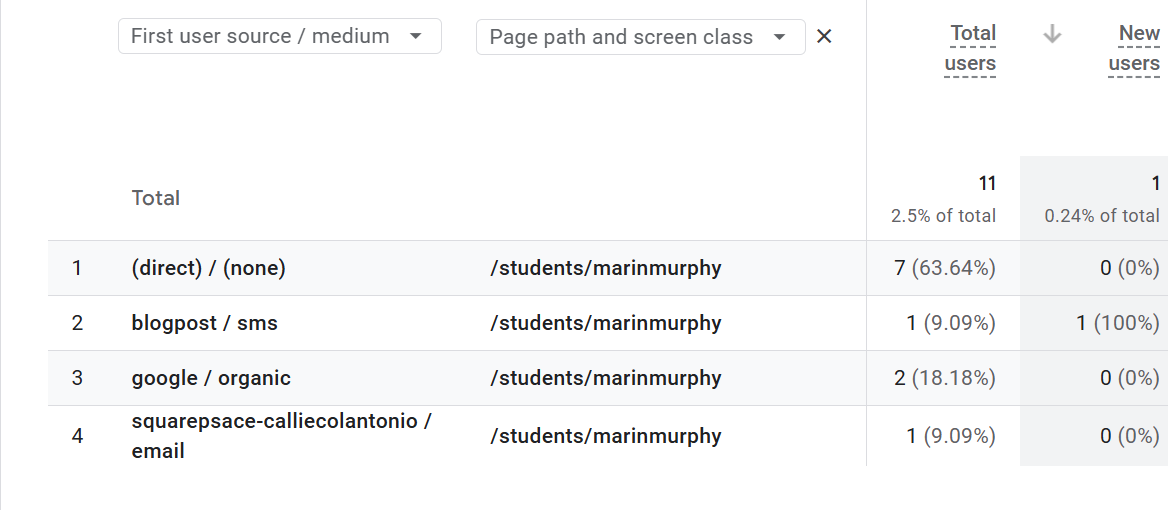
My analytics include data from email, LinkedIn, text messages, and Google.
In a 2 week time frame, the total users who viewed my blog amounted to 11 people, despite only directly emailing it to three and sharing it on LinkedIn. Based on LinkedIn analytics, 114 people saw my post, and 3 visited the attached link. 4 people viewed my blog via email, meaning the original link was shared beyond the 3 I sent it to. My email link generated more attention to my blog post because sharing it to family resulted in them sharing it to others. Even though email drove more users, LinkedIn gave me better engagement. My LinkedIn post received 3 reactions, 1 repost, and an overall increase of traffic to my page, resulting in friend requests from mutual connections. These results show that even if I could not direct everyone to my blog page, I still received decent engagement. I found that it is easier to share information via a post, rather than trying to direct the viewer to another website. Next time, I will provide more information, giving direct details such as why I want the viewer to open my link. By doing this, the viewer understands why I am trying to direct him or her to my blog.